Will AI Replace Mobile Apps — or Make Them Smarter?
A research-backed architectural breakdown of AI assistants, mobile market spending ($167B), subscription retention dynamics, and the future of app user experience design.
We may spend less time opening apps. That doesn't mean we'll stop needing what they do.
You leave a meeting with a photo of a whiteboard and a promise to send something by Friday. The information is all there. Now comes the small, annoying job of putting it somewhere you'll remember to look.
Open the notes app, pull out the action items, move them into a task list, choose the dates, and set the reminders. Nothing particularly difficult. Still, it's easy to decide you'll deal with it later.
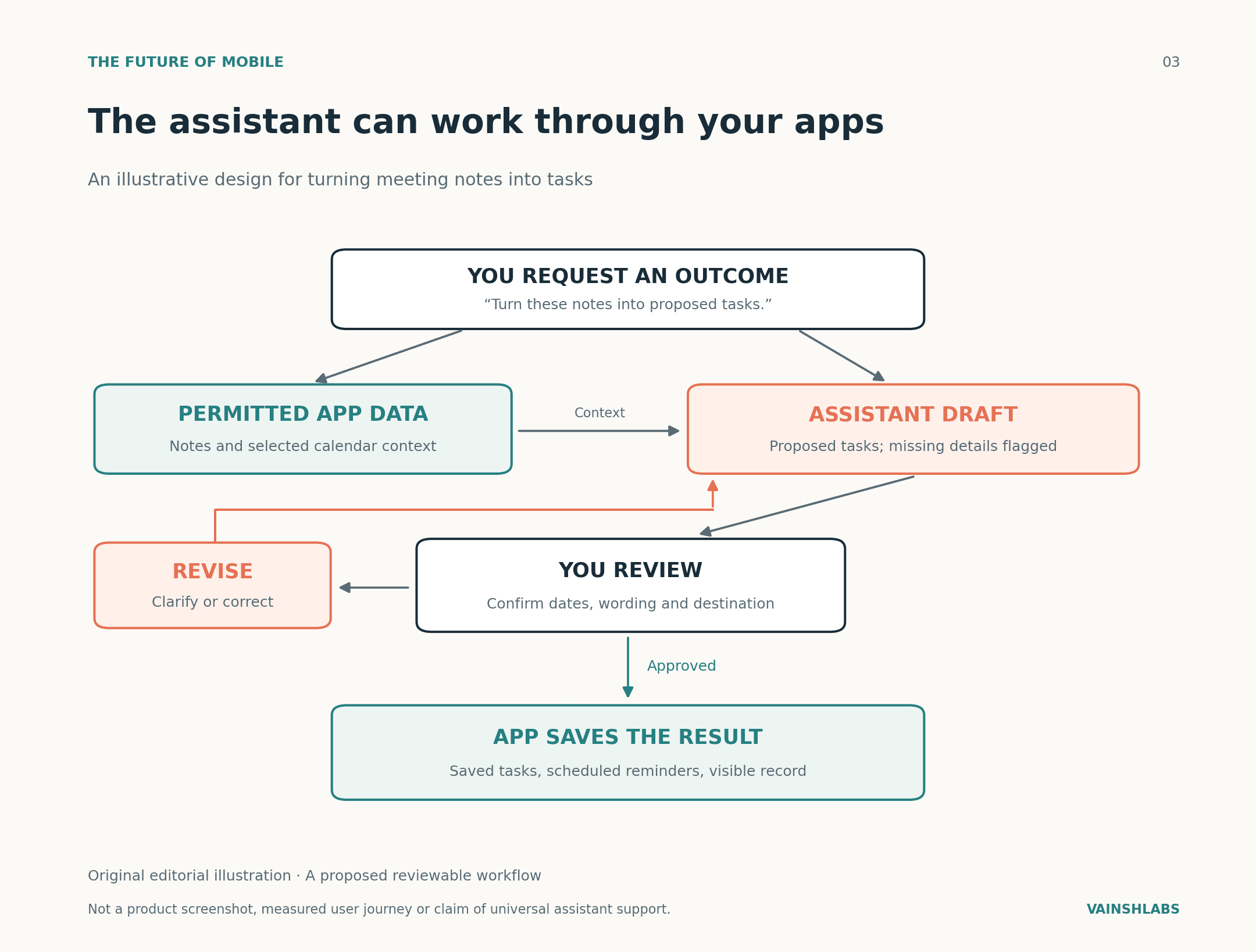
This is where the idea of an AI assistant starts to feel useful. Imagine handing it the notes and saying:
“Find what I need to do, show me the list, and help me schedule it.”
You would still review the result, but much of the tedious moving and copying could disappear.
Follow that thought a little further and you arrive at a fundamental question that matters to anyone building or using mobile software: if we can ask our phones to do things, how many apps will we need to open ourselves?
My view is that AI will take over some narrow app functions and make many other apps more useful. What interests me most is the space between those outcomes: apps that remain essential even as we spend less time looking at them.
1. How Mobile Capabilities Shift With AI
Take a cab booking. Asking an assistant for a ride could spare you the search box, destination entry, and a few other manual steps. But someone still has to find a driver, calculate the fare, process the payment, and deal with a cancellation. Those core responsibilities don't disappear when the booking begins in a conversation.
Now consider a separate app whose main purpose is rewriting short paragraphs. If a general assistant does that job well enough, keeping another subscription becomes a harder decision. A photo editor is a different case again. You might welcome AI that removes an unwanted object, then spend another ten minutes adjusting the picture yourself.
| What Changes | Everyday Example | What Remains Essential |
|---|---|---|
| A function moves elsewhere | A general assistant rewrites a paragraph | A separate rewriting app needs another reason to exist |
| An assistant handles the steps | It prepares a cab booking for you | The company still provides the ride, safety, and support |
| AI joins existing tools | A photo editor removes an unwanted object | You still control the picture and its final appearance |
Table 1. Possible ways products could change, rather than predictions about individual companies.
2. What the Mobile Market Data Actually Shows
Before writing off apps, though, it's worth looking at what consumers are actually spending.
According to Sensor Tower's State of Mobile 2026 report, consumer spending on paid apps, games, and in-app purchases reached $167 billion across iOS and Google Play in 2025, up 10.6%. Downloads grew 0.8%, while time spent grew 3.8%. Purchases of physical goods through apps sit outside that spending measure.
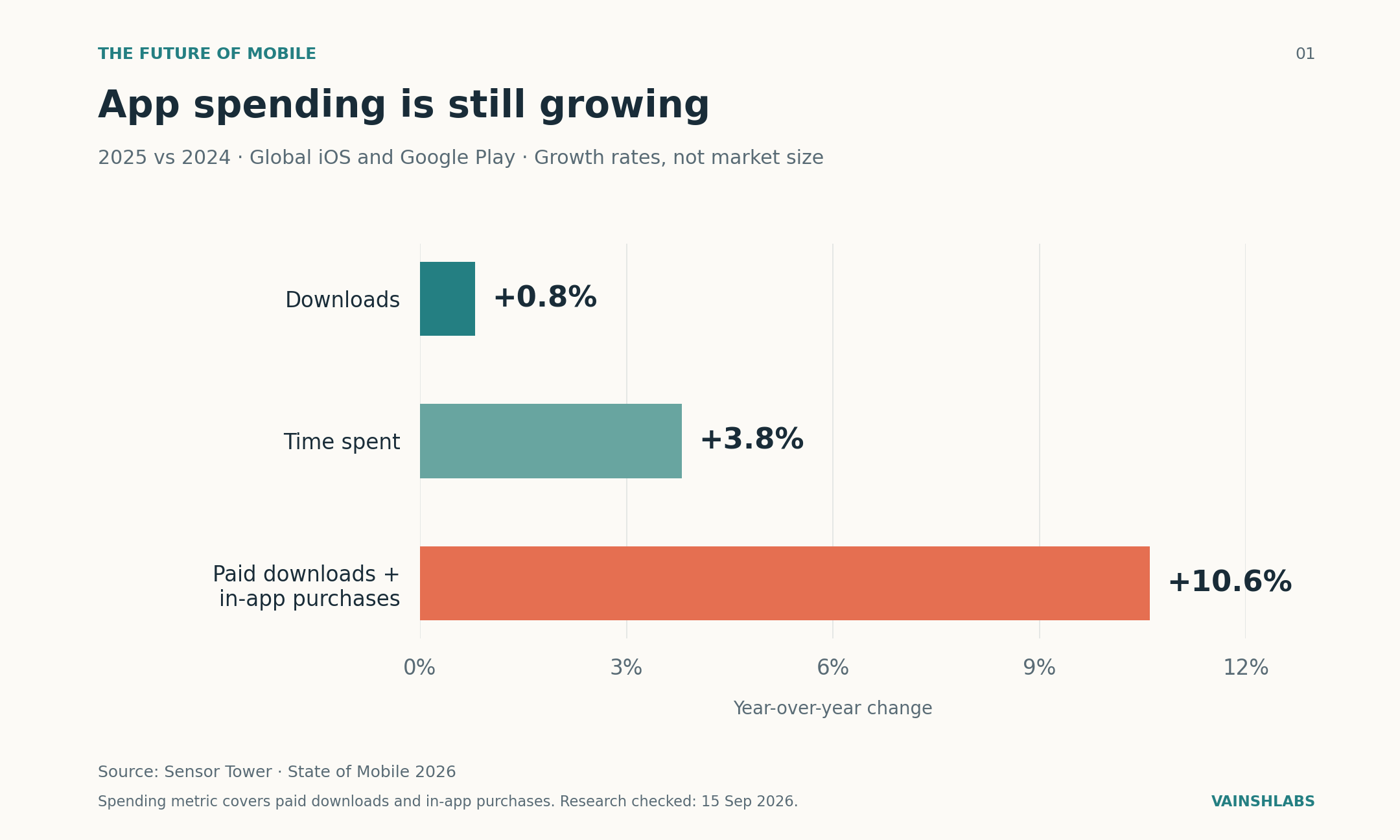
Figure 1. Growth in 2025 compared with 2024. Source: Sensor Tower's State of Mobile 2026.
Spending rose much faster than downloads. That suggests a mature market finding ways to earn more from its audience. It doesn't tell us how much of the growth AI caused, and a healthy total can hide struggling businesses underneath. Still, these figures give little support to the idea that the entire app market is falling apart. The question is where its value goes next.
AI's momentum is easier to see. In its June 2026 report, Sensor Tower projected 36 billion hours spent in generative AI apps during the first half of the year, against 17.2 billion a year earlier — an increase of roughly 109%.
3. Platform Integration: Google & Apple's AI Pipelines
Google's Gemini screen automation documentation describes a feature that can handle tasks in selected Android apps, such as preparing food orders and booking rides across supported devices.
Apple is making its own deep connections. Its June 2026 developer announcement describes App Intents updates that make app content and actions available directly to Siri and Apple Intelligence, alongside broader frameworks for running AI models on-device.
The implication is clear: an app's useful work can now be accessed from more places. You might begin with an assistant, a screen you're already viewing, or the app itself. For developers, that opens another route to the user. It also means the app's home screen may play a smaller part in the relationship.
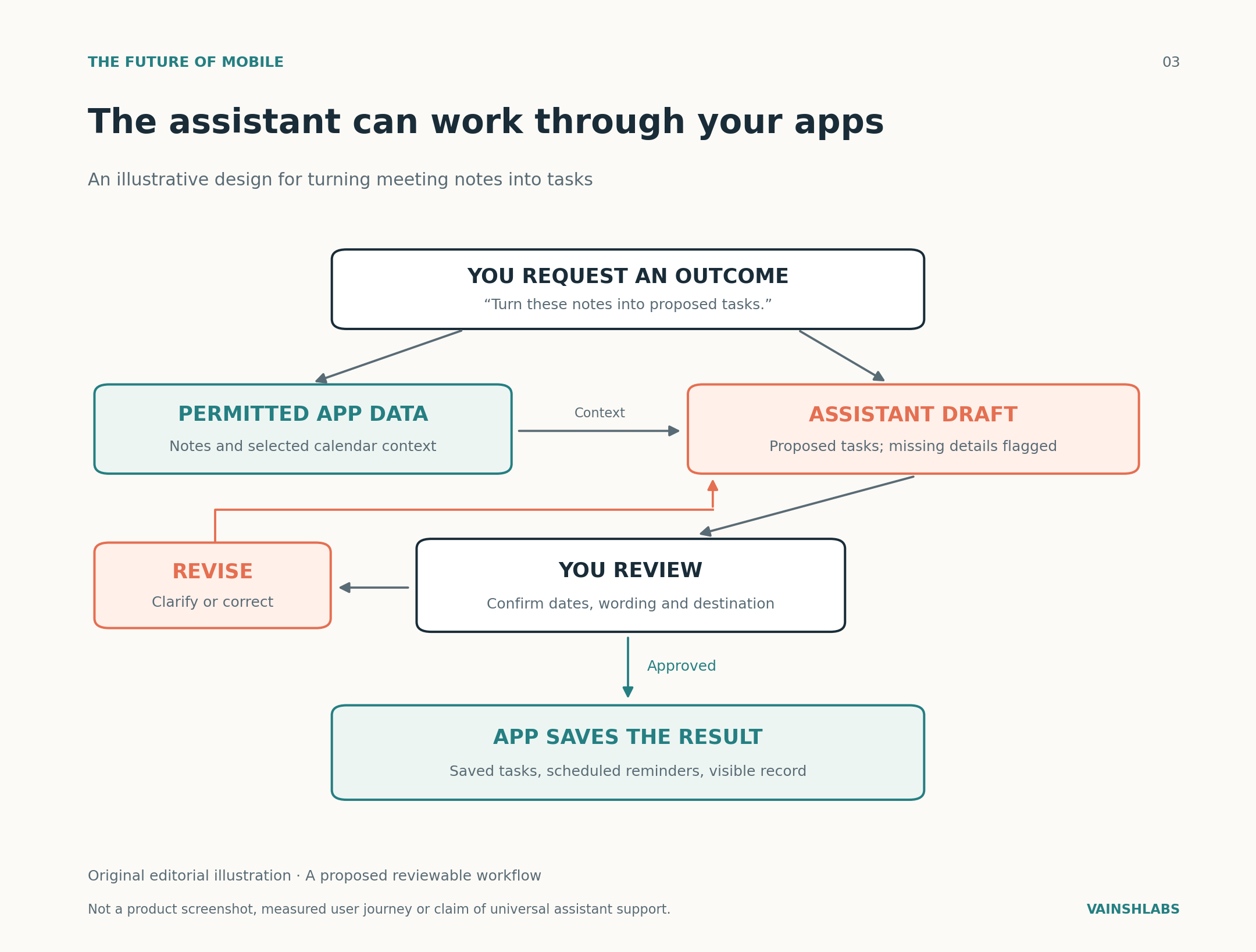
Figure 2. A proposed design for turning meeting notes into tasks with explicit permission boundaries.
4. UI/UX Control vs. Conversation
There are plenty of situations where you still need a visual touch interface:
- "Remind me about this tomorrow morning" is easy to say.
- Explaining exactly how you want ten holiday photographs cropped and arranged sounds like work.
Sometimes you only recognize the right result when you see it. A slider, a map, or a few thumbnails can help you get there faster than another round of prompts.
| What You Want to Do | Where AI Could Help | What You May Still Want to Control |
|---|---|---|
| Set a reminder | Understand request & suggest a date | Time, recurrence, and confirmation |
| Sort meeting notes | Extract proposed tasks & missing details | Wording, source notes, and approval |
| Compare products | Narrow options around requirements | Images, filters, and final comparison |
| Edit a photograph | Suggest or make a targeted change | Fine adjustments and un-do history |
| Work through a lesson | Adapt an explanation when stuck | Pace and practical exercises |
5. The Economics of AI Subscriptions: Realized Revenue vs. Retention
Adding a useful AI feature and persuading users to keep paying for it are separate challenges.
RevenueCat's State of Subscription Apps 2026 puts median first-year realized revenue per payer at $30.16 for AI apps vs. $21.37 for non-AI apps — a premium of about 41%.
However, annual-plan retention after 12 months sits at 21.1% for AI apps compared with 30.7% for non-AI apps — a gap of 9.6 percentage points.
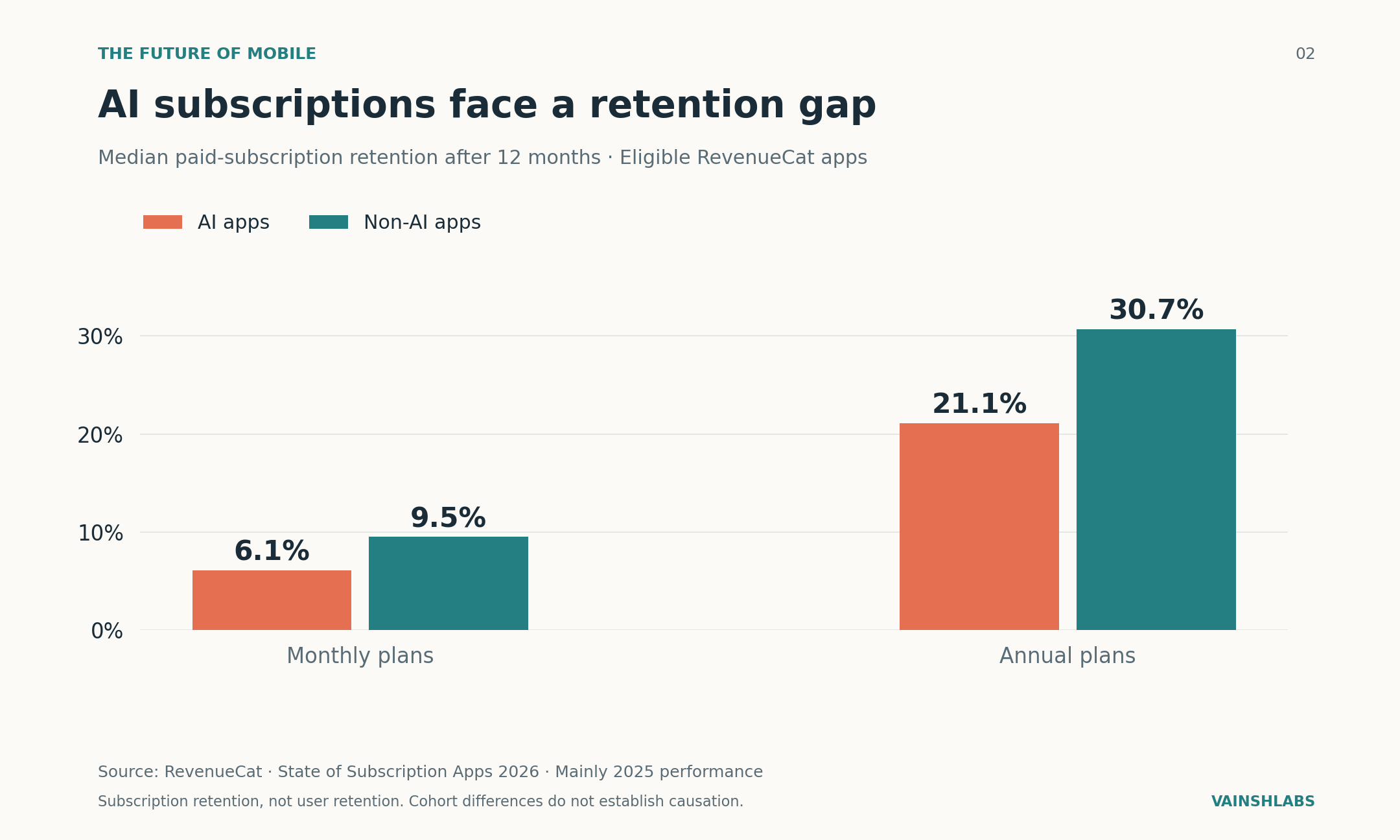
Figure 3. Median paid-subscription retention after 12 months. Source: RevenueCat 2026 Report.
RevenueCat's August 2026 follow-up study shows that among top-performing AI apps, retention reached 30.7% on annual plans, matching the non-AI benchmark. This proves that an "AI" label alone doesn't guarantee long-term retention — product utility and everyday habit-building do.
6. Architecture & Privacy Boundaries
Handing an assistant private data requires clear answers:
- On-device vs. Cloud Processing: Apple's Foundation Models Overview details both on-device model execution and secure cloud extension options.
- Local Reliability: For personal diaries, health trackers, and notebooks, local on-device inference protects privacy and guarantees offline access.
- Reliability & Prompt Injection: Systems must guard against hallucinated tasks or prompt injection attacks in unvetted content before executing mutations.
Conclusion: The Future of Mobile Apps
We'll keep plenty of apps, but we will become far less willing to do tedious data-entry work inside them.
- Narrow utilities that only perform simple text transformations will struggle to justify separate installations.
- Core service platforms (Logistics, Fintech, Health, Workspace) will become easier to use because AI handles the awkward friction points.
- Creative and exploratory apps will thrive because touching, choosing, and visual editing are fundamental to human control.
About the Research: Research checked 15 September 2026. Sensor Tower, RevenueCat, Google, and Apple documentation cited in research notes.
Share this article
Related Articles
The Hidden Cost of Vibe Coding: Who Reviews the Code?
AI can write your code in seconds. But who is responsible when that code is wrong? A research-backed breakdown of vibe coding, verification bottlenecks, security risks, and software trust.
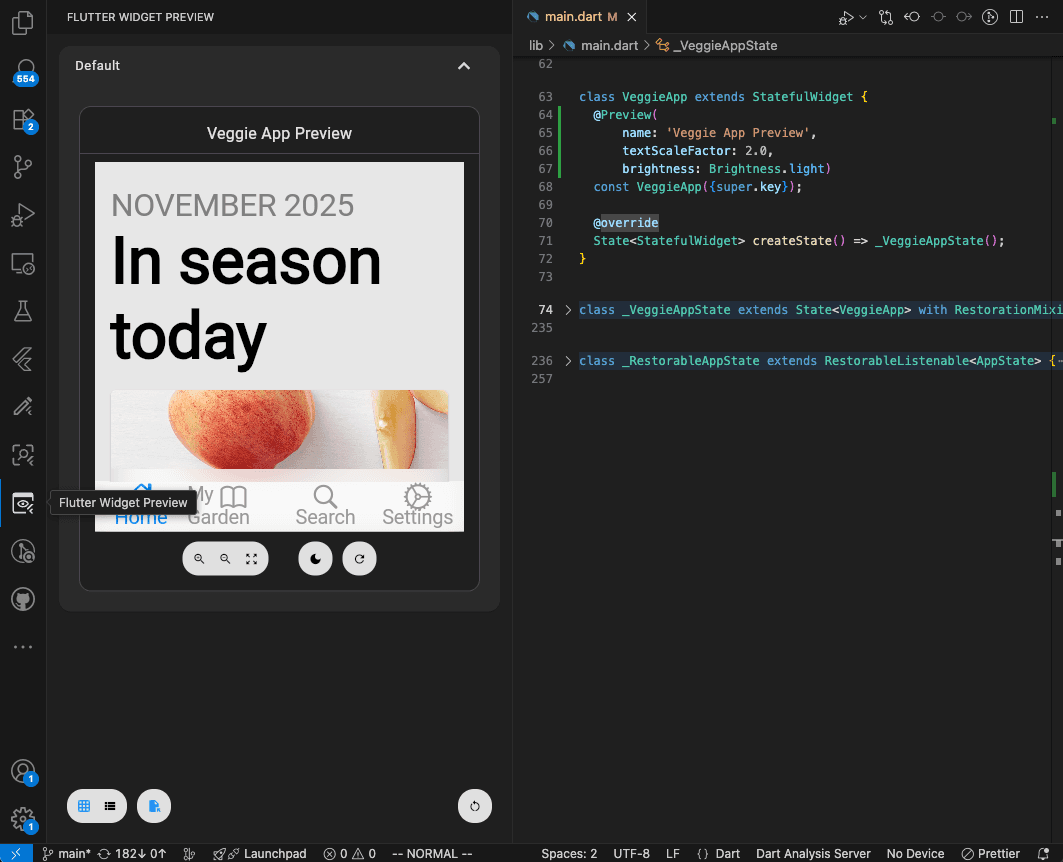
Flutter Widget Previews: Build Your First UI Component Without Opening the Whole App
Learn Flutter Widget Previews with a simple reminder card, official screenshots, and practical exercises for checking layouts and larger text.
Flutter vs Native Development in 2026: How Should Businesses Choose?
A comprehensive, data-backed architectural guide comparing Flutter and Native (Swift & Kotlin) mobile development — covering cost, market share, performance, team velocity, real-world enterprise case studies, and a step-by-step decision framework.