Flutter 3.47: A Major Step Toward a More Modular, Faster, and Future-Ready Framework
Flutter 3.47 introduces standalone Material and Cupertino UI packages, default Impeller renderer on desktop, mandatory UIScene for iOS 27, Wasm deferred loading, Widget Previews, and GenUI evolution.
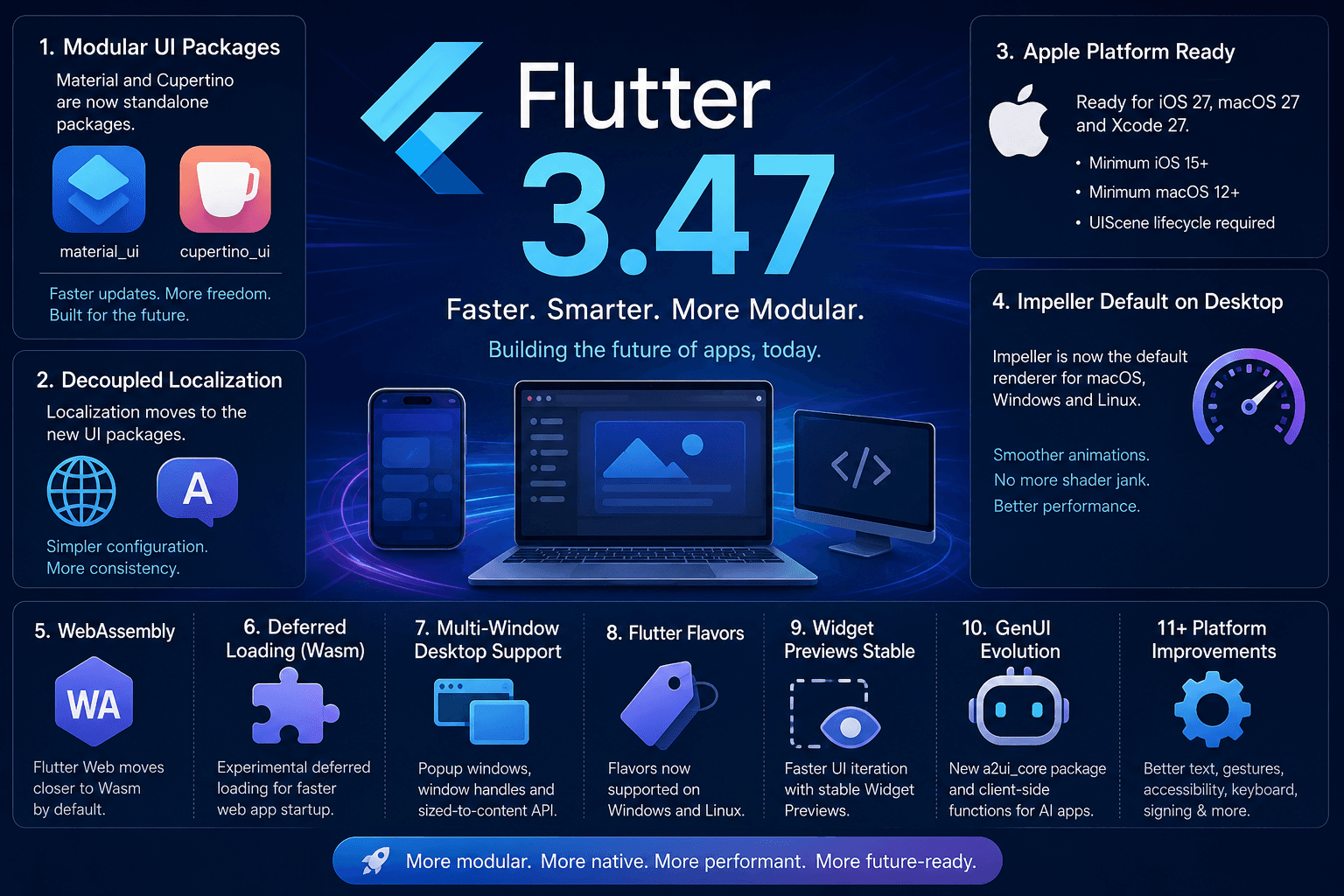
Flutter 3.47 is here — and this release is about much more than a collection of small improvements.
The biggest story is architectural: Flutter is moving toward a more modular ecosystem where UI libraries can evolve independently from the core SDK, while the rendering engine is becoming faster and more consistent across desktop platforms.
At the same time, Flutter 3.47 prepares developers for the next generation of Apple platforms, pushes Flutter Web closer to WebAssembly by default, makes Widget Previews stable, and continues expanding GenUI.
Here are the major features and updates every developer should know about.
1. Material and Cupertino Become Standalone Packages
One of the biggest changes in Flutter 3.47 is the introduction of standalone material_ui and cupertino_ui packages.
Historically, Material and Cupertino widgets were bundled directly inside Flutter's core SDK. That meant changes to these design systems were tied closely to Flutter's release cycle.
Now, they can evolve independently. Both packages have reached version 1.0 and are available as standalone packages. Developers can opt into them without immediately upgrading the entire Flutter SDK.
Why does this matter?
Imagine you want the latest Material widget improvements, but your production application needs to remain on a particular Flutter SDK version. Previously, those two requirements could conflict.
With standalone packages, the UI layer can move faster than the framework itself:
- Faster updates for Material and Cupertino widgets
- Independent bug fixes delivered outside framework releases
- More frequent releases for UI components
- Easier community contributions
- More freedom to build custom design systems
Flutter is effectively separating the framework from the design system.
Migration
Flutter provides an automated migration command:
dart fix --apply --code=migrate_design_widgets
The tool updates imports from the traditional Flutter Material and Cupertino packages to the new standalone packages. There is also a compatibility bridge designed to help applications migrate while some dependencies still use the older imports.
The bigger picture
This is not simply a package rename. It is the beginning of a more modular Flutter architecture where design systems can evolve without waiting for quarterly SDK releases.
Flutter indicates that the original design libraries in the core SDK are scheduled for formal deprecation in the November stable release, so teams should start planning their migration now.
2. Localization Is Also Being Decoupled
The modularization doesn't stop at widgets. Flutter's Material and Cupertino localization data is also moving into the standalone packages.
Previously, developers commonly imported:
package:flutter_localizations/flutter_localizations.dart
With the new approach, localization delegates are provided through the standalone UI packages. For example:
import 'package:material_ui/material_ui.dart';

final localizationsDelegates = GlobalMaterialLocalizations.delegates;
The new setup simplifies localization configuration because the required Material, Cupertino, and widget delegates can be included together.
Why developers should care
Localization often becomes complicated as an application grows. Decoupling localization from the core framework makes the architecture cleaner and more consistent with Flutter's broader move toward modular design.
3. Flutter 3.47 Prepares for iOS 27, macOS 27, and Xcode 27
Apple's upcoming platform changes are another major focus of Flutter 3.47. Flutter has updated its tooling and platform support in preparation for Xcode 27, iOS 27, and macOS 27.
However, there is an important breaking change regarding minimum OS requirements:
| Platform | Previous Minimum | Flutter 3.47 Minimum | |---|---|---| | iOS | 13 | 15 | | macOS | 10.15 | 12 |
If you maintain an older application supporting legacy Apple devices, this change deserves attention before upgrading your SDK version.
4. UIScene Is Now Mandatory for iOS 27
One of the most important Apple-related changes is the adoption of the UIScene lifecycle. The iOS 27 SDK requires UIKit applications to use UIScene. Applications built using Xcode 27 that don't adopt it can fail to launch.
For most Flutter applications, the Flutter CLI handles the migration automatically. However, developers need to pay particular attention if their application:
- Contains custom native iOS code
- Modifies
AppDelegate - Uses plugins with legacy lifecycle assumptions
Those projects may require manual migration steps.
Practical Advice: Test your Flutter applications against Apple's beta SDKs early, especially if your application contains custom native integrations.
5. Intel Mac Support Is Being Phased Out
Apple has been moving aggressively toward Apple Silicon, and Flutter is following that direction. Flutter 3.47 is winding down support for Intel-based Macs.
Automated testing on Intel hardware has been disabled, and Flutter now provides warnings when developers build on Intel hosts or target dual architectures.
Developers can also opt into ARM64-only macOS builds:
flutter config --enable-macos-arm64-only
What this means
If your development or CI infrastructure still depends heavily on Intel Macs, now is the time to review that setup. Flutter indicates that today's warnings will eventually become hard errors in upcoming releases.
6. Swift Package Manager Gets Even More Important
Swift Package Manager continues to replace CocoaPods in the Flutter iOS ecosystem. Flutter reports that 92 of the top 100 iOS plugins have now migrated to Swift Package Manager.
Developers who previously disabled Swift Package Manager can enable it again with:
flutter config --enable-swift-package-manager
Why this matters
CocoaPods is now in maintenance mode. This means Flutter developers should increasingly expect SwiftPM to become the standard dependency-management path for Apple platforms. If you're maintaining a Flutter plugin, SwiftPM migration should be on your immediate roadmap.
7. Flutter Web Moves Closer to WebAssembly by Default
Flutter is continuing its journey toward making WebAssembly (Wasm) the default technology for Flutter Web. Developers can test Wasm builds using:
flutter build web --release --wasm
Why Wasm?
WebAssembly provides more native-like execution characteristics inside browsers, bringing better performance and a stronger foundation for large-scale web applications.
However, Wasm applications require the newer JavaScript interoperability approach based around package:web rather than legacy dart:html.
8. Experimental Deferred Loading for Wasm
Flutter 3.47 also introduces experimental deferred loading for Wasm.
Instead of downloading the entire application at once, larger applications can divide their Wasm application into smaller modules that are loaded on demand:
flutter build web --release --wasm --enable-wasm-deferred-loading
Why this matters
Initial bundle loading time is a critical metric for web apps. Lazy-loading application modules significantly reduces initial load time, making large Flutter Web applications much more viable for production web deployment.
9. Impeller Is Now the Default Renderer on Desktop
This is arguably one of the most exciting performance changes in Flutter 3.47: Impeller is now the default renderer for macOS, Windows, and Linux.
Impeller is Flutter's next-generation rendering engine, designed to replace Skia. Instead of dynamically compiling shaders during runtime, Impeller uses a fixed set of shaders compiled ahead of time (AOT).
Eliminating Shader Jank
By compiling shaders ahead of time, Impeller eliminates shader compilation jank, ensuring animations and visual transitions feel buttery smooth from the very first frame.
Impeller takes full advantage of modern graphics APIs on desktop:
- Metal on macOS
- Vulkan on Windows and Linux
This is a massive step forward in making desktop Flutter applications feel like true first-class native software.
10. Wide-Gamut Color on macOS
Flutter 3.47 enables Wide Gamut Color by default on supported macOS hardware.
This allows applications to take advantage of richer, more accurate color palettes — particularly valuable for:
- Design & creative tools
- Photography & video editing software
- Scientific & high-end visualization tools
11. Multi-Window Desktop Support Gets Better
Flutter's experimental multi-window capabilities continue to evolve. In Flutter 3.47, Windows and Linux gain support for popup windows, opening the door to:
- Context menus & dropdown popups
- Utility palettes & tool windows
- Secondary auxiliary windows
- Dockable desktop panels
Developers can also access underlying native window handles directly via windowHandle:
HWNDon WindowsNSWindowon macOSGtkWindowon Linux
This makes advanced desktop OS integrations considerably more practical and robust.
12. Sized-to-Content Windows
Flutter 3.47 introduces a new sized-to-content API for desktop.
Instead of manually calculating the pixel dimensions of a dialog or secondary window, the window can automatically calculate its bounds based on its contents. This significantly improves the developer experience when creating dynamic desktop dialogs and tooltips.
13. Flutter Flavors Arrive on Windows and Linux
Flutter flavors are no longer restricted to mobile builds. Windows and Linux now natively support Flutter flavors:
flutter build windows --flavor flavor_a
# or
flutter build linux --flavor flavor_a
This simplifies build pipelines for applications requiring distinct target environments:
- Development
- Staging
- Production
- Enterprise / White-label variants
Different assets and configuration files can now be mapped directly to each desktop flavor.
14. Sharper Desktop Text with SDF Rendering
Desktop displays often have lower pixel densities than mobile devices, making font rendering flaws more apparent.
Flutter 3.47 introduces Signed Distance Function (SDF) rendering for desktop text and vector curves when using Impeller on macOS, Linux, and Windows.
Result: Sharper text, cleaner vector curves, and vastly superior visual typography across all desktop screen resolutions.
15. Widget Previews Are Now Stable
Flutter Widget Preview has officially graduated to stable.
Instead of launching the entire application and navigating through multiple screens just to inspect a single UI component, developers can render individual widgets in isolation.
.widget_preview/
Key Highlights:
- Local Caching: Utilizes
.widget_preview/to avoid repeated build setups. - Theme Testing: The
PreviewThemeDataAPI supports sequential theme layering to test components against dark/light modes effortlessly. - Web Sync: Automatically synchronizes assets from the project's
web/directory when building web widget previews.
16. GenUI Continues to Evolve
Flutter continues pushing boundaries with GenUI and agentic user experiences. The genui package has reached version 0.10.0, introducing the new a2ui_core package to standardize protocol expressions and catalog entries.
Furthermore, client-side function support in A2UI allows AI agents to execute local client tasks (such as input validation and field calculation) without requiring full server round-trips for every interaction.
The Paradigm Shift:
Moving fromAI → Text ResponsetoAI → Dynamic UI → User Interaction → Application Action.
17. Android Keyboard Improvements
Flutter 3.47 resolves long-standing virtual keyboard bugs involving modifier keys such as Shift.
The key responder now avoids unnecessary physical key synthesis for software keyboard inputs, delivering predictable typing experiences for users and eliminating input workarounds for developers.
18. Updated Android Build Dependencies
Flutter 3.47 updates its default Android build tooling matrix:
- Java 17 (Minimum required version)
- Kotlin Gradle Plugin (KGP):
2.4.0 - Android Gradle Plugin (AGP):
9.1.0 - Gradle:
9.3.1
Default target SDK specifications:
compileSdkVersion: API 36
targetSdkVersion: API 36
minSdkVersion: API 24
19. Better iOS Code-Signing Diagnostics
Code signing on iOS is often a pain point. Flutter 3.47 improves CLI output during certificate selection by displaying both Team ID and Team Name, alongside more descriptive error messages when provisioning profile matching fails.
20. Accessibility Improvements
Flutter 3.47 enhances system-level accessibility integrations:
- Automatic detection of Android high-contrast and color-inversion modes via
MediaQueryData.highContrastandMediaQueryData.invertColors. - Improved semantic text ordering for nested spans.
- Focus control via
BlockSemanticsto manage keyboard focus traversal cleanly.
21. Better Text Selection and Scrolling
Text manipulation on mobile and desktop receives notable polish:
- Mobile selection handles remain steady during minor scrolling.
- Keyboard shortcuts can now dismiss open selection context menus.
- Android selection handles automatically reposition to prevent overlapping context menus.
- Fixed visual artifacts and crashes in
SelectableRegion.
22. Better Gestures and Scrolling
Gesture propagation for native iOS views embedded via platform views has been significantly improved.
Additionally, EdgeDraggingAutoScroller now respects the active scroll view's ScrollPhysics, preventing unwanted auto-scrolling when scrolling is explicitly disabled.
23. Useful Small Widget Improvements
Flutter 3.47 introduces several refined widget APIs:
ImageIcon: AddeduseOriginalColors: trueto preserve original asset colors without tinting.AnimatedCrossFade: ConfigurableclipBehaviorfor custom transition clipping.ImageStreamListener: Direct error callbacks for tracking image loading failures.
What Flutter 3.47 Really Means
Looking at these 23 updates together reveals a clear trajectory. Flutter is evolving across four strategic pillars:
- More Modular: Decoupling Material, Cupertino, and localization from core SDK releases.
- More Performant: Defaulting to Impeller across desktop and advancing Wasm performance.
- More Native: Adopting Apple's
UIScene, SwiftPM, multi-windowing, and native window handles. - More Future-Facing: Building infrastructure for GenUI and agentic AI-driven interfaces.
Should You Upgrade to Flutter 3.47?
For new projects, Flutter 3.47 is recommended immediately.
For production apps, review this pre-upgrade checklist:
- [ ] Audit imports for standalone
material_uiandcupertino_uipackages. - [ ] Verify iOS deployment target is iOS 15+ and macOS target is 12+.
- [ ] Ensure iOS native code supports
UIScene(Xcode 27 readiness). - [ ] Transition plugins from CocoaPods to Swift Package Manager.
- [ ] Audit Gradle configs for Java 17 and AGP 9.1 compatibility.
- [ ] Test web projects for
package:webcompatibility if targeting Wasm.
When ready, upgrade via:
flutter upgrade
Final Thoughts
Flutter 3.47 is an architectural milestone. By decoupling the UI layer, standardizing Impeller on desktop, and paving the way for WebAssembly and GenUI, Flutter is cementing its position as the premier cross-platform framework for 2026 and beyond.
Share this article